
TP-501 : The complete track to the Microsoft MCSA networking certification
- 140Training hours
- 46Lectures
- 5Assistant hours
- 2000Egyptian pounds
The complete track to the Microsoft
MCSA networking certification
Do you want to become a certified network engineer?
No prior knowledge of the subject? And you want to specialise in networking?
And to earn a trusted, internationally recognised certificate?
The complete training track in network engineering on Microsoft systems is not simply a course preparing you for the international MCSA certificate: it is a set of complete training courses. You need no prior knowledge and no previous experience to start this track, to specialise in networking, and to earn the title and an internationally recognised certificate from one of the largest companies in the world. We start with you at the beginning - and before the beginning!
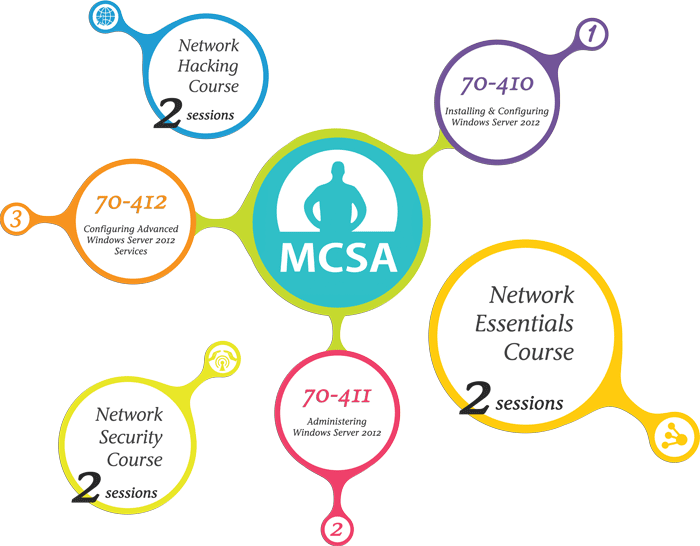
On this track you begin with an introduction to the fundamentals of networking, with nothing assumed, and then move on to a detailed, practical study of the three curricula (70-410, 70-411, 70-412) that prepare you for Microsoft's international MCSA (Microsoft Certified Solution Associate) certificate. But that is not all of it. There is still a course in the principles of network security and protection, and another in the principles of network penetration, after which you will unquestionably be qualified to work at the largest specialist companies as an expert network engineer certified by Microsoft.
Book "your future" now and take the discount and the benefits on offer for a limited period
Important notes on the offers and benefits
The offers, benefits and prices published here are available for a limited period and are subject to change without notice. Registering online through the form on this page, or by telephone, counts as an expression of interest only, and places no obligation on Seven Dash to honour the benefits, offers and prices current at the time of booking should they change later.
An actual booking has to be made at the company's own premises with a deposit paid, and that secures your right to all the benefits, offers and prices current at the time of booking, even if they are changed later.
What the programme covers
The complete track to the Microsoft
MCSA networking certification
Do you want to become a certified network engineer?
No prior knowledge of the subject? And you want to specialise in networking?
And to earn a trusted, internationally recognised certificate?
The complete training track in network engineering on Microsoft systems is not simply a course preparing you for the international MCSA certificate: it is a set of complete training courses. You need no prior knowledge and no previous experience to start this track, to specialise in networking, and to earn the title and an internationally recognised certificate from one of the largest companies in the world. We start with you at the beginning - and before the beginning!
On this track you begin with an introduction to the fundamentals of networking, with nothing assumed, and then move on to a detailed, practical study of the three curricula (70-410, 70-411, 70-412) that prepare you for Microsoft's international MCSA (Microsoft Certified Solution Associate) certificate. But that is not all of it. There is still a course in the principles of network security and protection, and another in the principles of network penetration, after which you will unquestionably be qualified to work at the largest specialist companies as an expert network engineer certified by Microsoft.
Book "your future" now and take the discount and the benefits on offer for a limited period
Important notes on the offers and benefits
The offers, benefits and prices published here are available for a limited period and are subject to change without notice. Registering online through the form on this page, or by telephone, counts as an expression of interest only, and places no obligation on Seven Dash to honour the benefits, offers and prices current at the time of booking should they change later.
An actual booking has to be made at the company's own premises with a deposit paid, and that secures your right to all the benefits, offers and prices current at the time of booking, even if they are changed later.
What the programme covers
Network Essentials Course- Networking Benefits
- Roles of Computer in A Network
- Type of Networks
- Network Share
- Scope Of Networks
- Basic Connectivity
- Network Technologies
- Expanding the Network
- Network Adapter
- Cables
- Warless
- Ethernet
- Bridges
- Switches
- Routers
- Getaways
- Remote Access
- PSTN
- ISDN
- ADSL
- Dynamic Access Control
- Operating System and Applications Hardening
- PKI Management
- Restricting Administrative Compromise
- Securing Network Traffic and Ports
- Securing PowerShell
- System Hacking
- Trojans and Backdoors
- Viruses and Worms
- Sniffers
- Hacking Webservers
- Lesson 1: Deploying and Managing Windows Server 2012
- » Windows Server 2012 Overview
- » Overview of Windows Server 2012 Management
- » Installing Windows Server 2012
- » Post-Installation Configuration of Windows Server 2012
- » Introduction to Windows PowerShell
- » Lab : Deploying and Managing Windows Server 2012
- Lesson 2: Introduction to Active Directory Domain Services
- » Overview of AD DS
- » Overview of Domain Controllers
- » Installing a Domain Controller
- » Lab : Installing Domain Controllers
- Lesson 3: Managing Active Directory Domain Services Objects
- » Managing User Accounts
- » Managing Groups
- » Managing Computer Accounts
- » Delegating Administration
- » Lab : Managing Active Directory Domain Services Objects
- Lesson 4: Automating Active Directory Domain Services Administration
- » Using Command-line Tools for Administration
- » Using Windows PowerShell for Administration
- » Performing Bulk Operations with Windows PowerShell
- » Lab : Automating AD DS Administration by Using Windows PowerShell
- Lesson 5: Implementing IPv4
- » Overview of TCP/IP
- » Understanding IPv4 Addressing
- » Subnetting and Supernetting
- » Configuring and Troubleshooting IPv4
- » Lab : Implementing IPv4
- Lesson 6: Implementing DHCP
- » Installing a DHCP Server Role
- » Configuring DHCP Scopes
- » Managing a DHCP Database
- » Securing and Monitoring DHCP
- » Lab : Implementing DHCP
- Lesson 7: Implementing DNS
- » Name Resolution for Windows Client and Servers
- » Installing and Managing a DNS Server
- » Managing DNS Zones
- » Lab : Implementing DNS
- Lesson 8: Implementing IPv6
- » Overview of IPv6
- » IPv6 Addressing
- » Coexistence with IPv6
- » IPv6 Transition Technologies
- » Lab : Implementing IPv6
- Lesson 9: Implementing Local Storage
- » Overview of Storage
- » Managing Disks and Volumes
- » Implementing Storage Pools
- » Lab : Implementing Local Storage
- Lesson 10: Implementing File and Print Services
- » Securing Files and Folders
- » Protecting File Shares with Shadow Copies
- » Configuring Network Printing
- » Lab : Implementing File and Print Services
- Lesson 11: Implementing Group Policy
- » Overview of Group Policy
- » Group Policy Processing
- » Implementing a Central Store for Administrative Templates
- » Lab : Implementing Group Policy
- Lesson 12: Securing Windows Servers by Using Group Policy Objects
- » Windows Security Overview
- » Configuring Security Settings
- » Restricting Software
- » Configuring Windows Firewall with Advanced Security
- » Lab : Lab A: Increasing Security for Server Resources
- » Lab : Lab B: Configuring AppLocker and Windows Firewall
- Lesson 13: Implementing Server Virtualization with Hyper-V
- » Overview of Virtualization Technologies
- » Implementing Hyper-V
- » Managing Virtual Machine Storage
- » Managing Virtual Networks
- » Lab : Implementing Server Virtualization with Hyper-V
- Lesson 1: Deploying and Maintaining Server Images
- » Overview of Windows Deployment Services
- » Implementing Deployment with Windows Deployment Services
- » Administering Windows Deployment Services
- » Lab : Using Windows Deployment Services to Deploy Windows Server 2012
- Lesson 2: Configuring and Troubleshooting Domain Name System
- » Installing the DNS Server Role
- » Configuring the DNS Server Role
- » Configuring DNS Zones
- » Configuring DNS Zone Transfers
- » Managing and Troubleshooting DNS
- » Lab : Configuring and Troubleshooting DNS
- Lesson 3: Maintaining Active Directory Domain Services
- » Overview of AD DS
- » Implementing Virtualized Domain Controllers
- » Implementing RODC
- » Administering AD DS
- » Managing the AD DS Database
- » Lab : Maintaining AD DS
- Lesson 4: Managing User and Service Accounts
- » Automating User Account Management
- » Configuring Password-Policy and User-Account Lockout Settings
- » Configuring Managed Service Accounts
- » Lab : Managing User and Service Accounts
- Lesson 5: Implementing a Group Policy Infrastructure
- » Introducing Group Policy
- » Implementing and Administering Group Policy Objects (GPOs)
- » Group Policy Scope and Group Policy Processing
- » Troubleshooting the Application of GPOs
- » Lab : Implementing a Group Policy Infrastructure
- Lesson 6: Managing User Desktops with Group Policy
- » Implementing Administrative Templates
- » Configuring Folder Redirection and Scripts
- » Configuring Group Policy Preferences
- » Managing Software with Group Policy
- » Lab : Managing User Desktops with Group Policy
- Lesson 7: Configuring and Troubleshooting Remote Access
- » Configuring Network Access
- » Configuring Virtual Private Network (VPN) Access
- » Overview of Network Policies
- » Troubleshooting Routing and Remote Access
- » Configuring DirectAccess
- » Lab : Configuring Remote Access
- » Lab : Configuring DirectAccess
- Lesson 8: Installing, Configuring, and Troubleshooting the Network Policy Server Role
- » Installing and Configuring a NPS
- » Configuring Remote Authentication Dial-In User Service (RADIUS) Clients and Servers
- » NPS Authentication Methods
- » Monitoring and Troubleshooting a NPS
- » Lab : Installing and Configuring a Network Policy Server
- Lesson 9: Implementing Network Access Protection
- » Overview of Network Access Protection
- » Overview of NAP Enforcement Processes
- » Configuring NAP
- » Monitoring and Troubleshooting NAP
- » Lab : Implementing NAP
- Lesson 10: Optimizing File Services
- » Overview of FSRM
- » Using FSRM to Manage Quotas, File Screens, and Storage Reports
- » Implementing Classification and File Management Tasks
- » Overview of Distributed File System (DFS)
- » Configuring DFS Namespaces
- » Configuring and Troubleshooting Distributed File System Replication (DFS-R)
- » Lab : Configuring Quotas and File Screening Using FSRM
- » Lab : Implementing DFS
- Lesson 11: Configuring Encryption and Advanced Auditing
- » Encrypting Files by Using Encrypting File System
- » Configuring Advanced Auditing
- » Lab : Configuring Encryption and Advanced Auditing
- Lesson 12: Implementing Update Management
- » Overview of WSUS
- » Deploying Updates with WSUS
- » Lab : Implementing Update Management
- Lesson 13: Monitoring Windows Server 2012
- » Monitoring Tools
- » Using Performance Monitor
- » Monitoring Event Logs
- » Lab : Monitoring Windows Server 2012
- Lesson 1: Deploying and Managing Windows Server 2012
- » Windows Server 2012 Overview
- » Overview of Windows Server 2012 Management
- » Installing Windows Server 2012
- » Post-Installation Configuration of Windows Server 2012
- » Introduction to Windows PowerShell
- » Lab : Deploying and Managing Windows Server 2012
- Lesson 2: Introduction to Active Directory Domain Services
- » Overview of AD DS
- » Overview of Domain Controllers
- » Installing a Domain Controller
- » Lab : Installing Domain Controllers
- Lesson 3: Managing Active Directory Domain Services Objects
- » Managing User Accounts
- » Managing Groups
- » Managing Computer Accounts
- » Delegating Administration
- » Lab : Managing Active Directory Domain Services Objects
- Lesson 4: Automating Active Directory Domain Services Administration
- » Using Command-line Tools for Administration
- » Using Windows PowerShell for Administration
- » Performing Bulk Operations with Windows PowerShell
- » Lab : Automating AD DS Administration by Using Windows PowerShell
- Lesson 5: Implementing IPv4
- » Overview of TCP/IP
- » Understanding IPv4 Addressing
- » Subnetting and Supernetting
- » Configuring and Troubleshooting IPv4
- » Lab : Implementing IPv4
- Lesson 6: Implementing DHCP
- » Installing a DHCP Server Role
- » Configuring DHCP Scopes
- » Managing a DHCP Database
- » Securing and Monitoring DHCP
- » Lab : Implementing DHCP
- Lesson 7: Implementing DNS
- » Name Resolution for Windows Client and Servers
- » Installing and Managing a DNS Server
- » Managing DNS Zones
- » Lab : Implementing DNS
- Lesson 8: Implementing IPv6
- » Overview of IPv6
- » IPv6 Addressing
- » Coexistence with IPv6
- » IPv6 Transition Technologies
- » Lab : Implementing IPv6
- Lesson 9: Implementing Local Storage
- » Overview of Storage
- » Managing Disks and Volumes
- » Implementing Storage Pools
- » Lab : Implementing Local Storage
- Lesson 10: Implementing File and Print Services
- » Securing Files and Folders
- » Protecting File Shares with Shadow Copies
- » Configuring Network Printing
- » Lab : Implementing File and Print Services
- Lesson 11: Implementing Group Policy
- » Overview of Group Policy
- » Group Policy Processing
- » Implementing a Central Store for Administrative Templates
- » Lab : Implementing Group Policy
- Lesson 12: Securing Windows Servers by Using Group Policy Objects
- » Windows Security Overview
- » Configuring Security Settings
- » Restricting Software
- » Configuring Windows Firewall with Advanced Security
- » Lab : Lab A: Increasing Security for Server Resources
- » Lab : Lab B: Configuring AppLocker and Windows Firewall
- Lesson 13: Implementing Server Virtualization with Hyper-V
- » Overview of Virtualization Technologies
- » Implementing Hyper-V
- » Managing Virtual Machine Storage
- » Managing Virtual Networks
- » Lab : Implementing Server Virtualization with Hyper-V
Important notes
To obtain the certificate you must sit the following Microsoft exams
- Installing and Configuring Windows Server 2012 (exam 410)
- Administering Windows Server 2012 (exam 411)
- Configuring Advanced Windows Server 2012 Services (exam 412)
Important notes
To obtain the certificate you must sit the following Microsoft exams
- Installing and Configuring Windows Server 2012 (exam 410)
- Administering Windows Server 2012 (exam 411)
- Configuring Advanced Windows Server 2012 Services (exam 412)
Meet the trainers on this course

Trainer, networking and computer maintenance specialist
An expert in computer networks, certified by Microsoft, Cisco and CIW, with long practical experience of building, administering and securing networks on every version of Windows Server and on Cisco hardware, and of computer maintenance generally, as well as more than ten years in training.
A message for the trainer? Send it from here.A message for the trainer? Send it from here.
The questions we are asked most about this training programme
- Do I need any prior grounding in networking to start this track?
- Not at all. There are no prerequisites for starting this track. We begin with every trainee from the beginning, which is why the track includes preparatory courses that make sure trainees have everything they need before they start the courses that prepare them for the Microsoft exams.
- What is the difference between taking this track and taking only the courses that prepare for the Microsoft MCSA certificate?
- This training track offers a great deal more than the preparatory courses on their own. With it you get additional courses - some to bring you into the field from the start, others covering further ground such as security and penetration - so that you are fully equipped to stand out from other people in the job market. On top of that there is the completely different way we teach, which rests on practical work and on passing the experience of the market on to the trainees, and the extras that come free with the track: the free books, the additional certificates, the discount coupons and the rest.
- Which exams do I have to sit to obtain the Microsoft MCSA certificate?
- To obtain the MCSA certificate from Microsoft you have to pass three exams: Installing and Configuring Windows Server 2012 (Exam 410) Administering Windows Server 2012 (Exam 411) Configuring Advanced Windows Server 2012 Services (Exam 412)
- Is the cost of the Microsoft exams included in the cost of this track?
- No. The Microsoft certificates are charged for separately from the cost of this track, and they are optional for the student: if you want to sit the Microsoft exams for the MCSA certificate, the cost of the exams is settled separately and the exam dates are arranged then.
- Which certificates will I receive from Seven Dash when I study this training track?
- Seven Dash awards you three attendance certificates, at no additional cost, recording that you have completed each of the training courses included in this track
What else comes with this course
-
Drinks cafeteria -

A room worth sitting in -

Support that continues -

Private assistant hours
Reserve your seat on this course
Enter your details now and we will call you to fix a date and take you through the booking.
Have a question ?
We are glad to help you get a better grasp of things, so do not hesitate to contact us if you have any questions at all.